This article is for informational purposes only and does not constitute legal advice. Consult qualified legal counsel for guidance specific to your jurisdiction.
Why Security Cameras in the Workplace Create Both Protection and Risk
For many multi-location businesses, security cameras in the workplace are a necessity. They help deter theft, support employee safety, document incidents, and reduce operational blind spots. But the same systems that protect your business can also create legal exposure if they are deployed without clear policies, proper notice, and the right operational boundaries.
If you skip surveillance altogether, you may increase the risk of theft, safety incidents, and unresolved disputes. If you deploy it carelessly, you may create privacy complaints, labor disputes, or regulatory exposure.
This guide explains what the law generally allows, what may cross the line, and how proactive visual monitoring can help reduce the incidents that create liability in the first place.
Why Security Cameras in the Workplace Are a Legal and Liability Double-Edged Sword
Businesses rely on workplace cameras for more than just recording incidents. In retail stores, warehouses, healthcare facilities, office buildings, and other high-traffic environments, video surveillance helps deter theft, improve employee safety, document incidents, and provide visibility into entrances, parking lots, stockrooms, and other vulnerable areas.
The business rationale is straightforward. Theft, workplace incidents, and unresolved liability claims can create significant operational and financial risk, which is why security cameras in the workplace remain a core part of many security programs. But the same systems that protect your business can also create exposure if they are deployed without clear policies, proper notice, or defined operational boundaries.
That tension is what makes workplace surveillance both a security tool and a governance issue.
That is where the concept of a legitimate business purpose becomes critical. In most cases, lawful workplace monitoring is tied to objectives such as:
- Employee safety
- Loss prevention
- Access control
- Premises security
- Incident documentation
- Protection of inventory, cash, or restricted areas
Problems typically begin when monitoring extends beyond those purposes — whether through inappropriate camera placement, improper audio recording, inconsistent footage use, or unclear employee notification.
For multi-location businesses, workplace surveillance is more than a technology decision. It is both a compliance issue and an operational risk-management strategy, especially for organizations also focused on after-hours employee safety and protecting employees working alone across distributed locations.
What the Law Says About Security Cameras in the Workplace
There is no broad federal law that outright bans workplace cameras. But several federal and state rules create the legal boundaries for video surveillance in the workplace, especially when privacy, labor activity, and audio recording are involved.
Federal Law Baseline
Two federal legal frameworks are especially important here.
Electronic Communications Privacy Act (ECPA)
The ECPA helps define limits around monitoring where private communications are involved. In workplace settings, the law becomes relevant when surveillance intrudes on spaces or conversations where employees may reasonably expect privacy.
National Labor Relations Act (NLRA) — Section 7
NLRA Section 7 protects employees’ rights to engage in protected concerted activity, including discussing workplace conditions and participating in union-related activity. Employers cannot use cameras to monitor, intimidate, or interfere with that protected conduct.
Together, these laws do not prohibit all security cameras in the workplace. But they define the outer fence around what employers can lawfully do.
State-by-State Considerations
A national surveillance policy helps, but state law ultimately governs many deployment decisions.
- California Invasion of Privacy Act (CIPA): CIPA is one of the clearest examples of strict audio consent law. If your system records confidential conversations without proper consent, the risk is significant.
- Connecticut: Often cited because it requires written employee notification for workplace monitoring in many cases.
- Texas and Florida: Generally seen as lower-restriction environments for video-only monitoring in common areas, but audio still requires separate legal analysis.
- New York and Illinois: Regulations continue to evolve as employment, privacy, and workplace technology rules change.
- Other states may be less restrictive for video-only monitoring, but audio, notice, and labor-related issues still need review.
The safest guidance is consistent: regulations evolve quickly, so always verify requirements based on laws regarding cameras in the workplace and related business security camera laws with your state labor board or employment counsel before finalizing your deployment.
Where Cameras Cannot Be Placed
Courts generally evaluate whether the employee’s privacy interest outweighs the employer’s business need. That is the practical meaning of a reasonable expectation of privacy.
Avoid cameras in:
- Restrooms
- Locker rooms
- Changing rooms
- Medical rooms
- Prayer rooms
- Employee lounges or break rooms, depending on context and state law
- Any other space where employees have a reasonable expectation of privacy
By contrast, cameras are more commonly permitted in entrances, exits, sales floors, parking lots, stockrooms, hallways, server rooms, and cash-handling areas when tied to a legitimate business purpose.
That legal baseline sets up the practical question: what should your team do — and avoid doing — when deploying workplace monitoring?
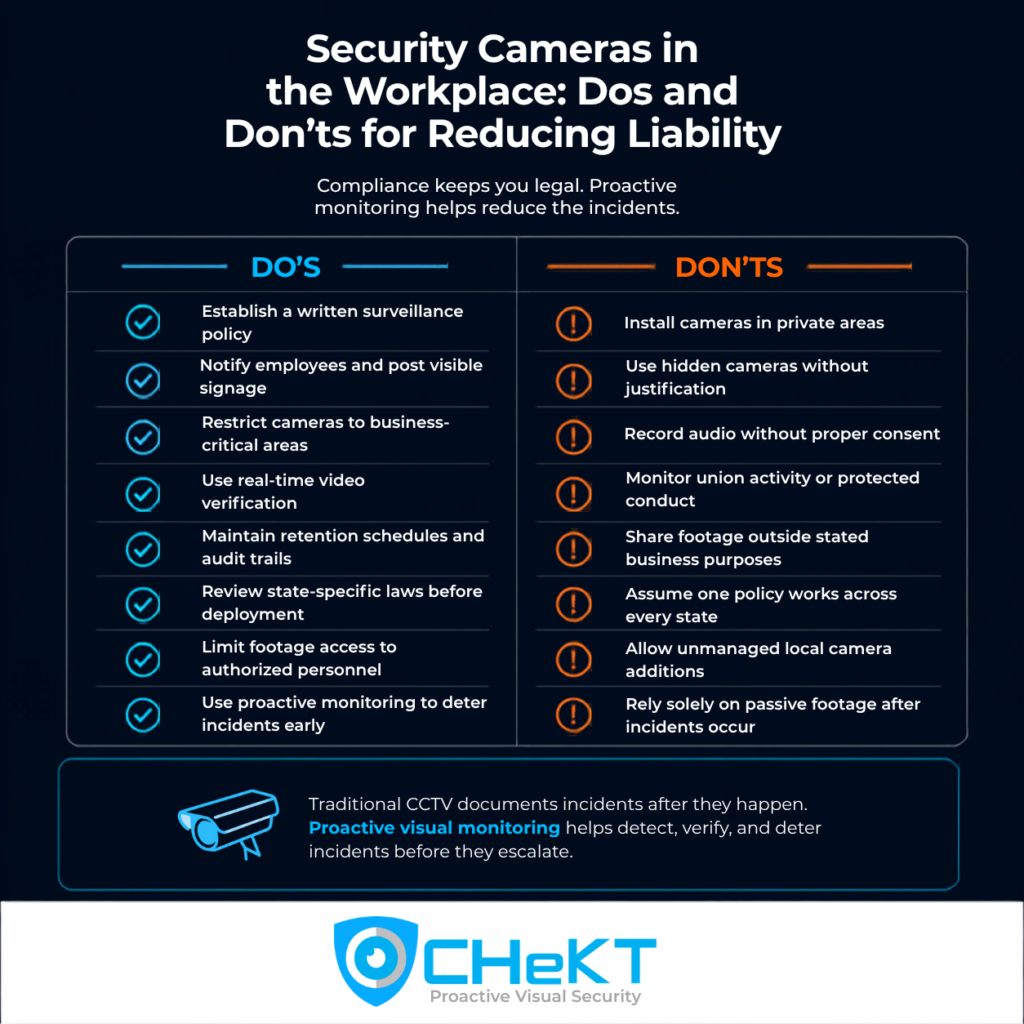
The Do’s: Best Practices for Compliant Workplace Video Surveillance
If you are deploying workplace liability security cameras, the strongest approach combines legal discipline with operational clarity.
Do Establish a Written Surveillance Policy
Every business using video surveillance in the workplace should maintain a written surveillance policy. At minimum, it should explain:
- The purpose of monitoring
- Camera locations
- Whether any devices capture audio
- Who can access live and recorded footage
- How long footage is retained
- How footage may be used in investigations
- How legal review is handled when state laws vary
This policy should live in your employee handbook and match actual field practice. If your handbook says monitoring is for safety and security, local managers should not be repurposing footage for unrelated uses.
Do Notify Employees and Post Visible Signage
Most states expect some form of disclosure, and several require written notice. Clear employee notification and visible signage reduce legal exposure because they weaken arguments that monitored areas carried a reasonable expectation of privacy.
Compliant notice typically includes:
- Written employee disclosure
- Acknowledgment where required
- Signage at entrances and monitored zones
- Bilingual signage where appropriate
Visible notice also supports behavior change. People tend to act differently when they know monitoring is active.
Do Restrict Cameras to Business-Critical Areas
Security cameras for office, retail, or warehouse sites should only be placed where there is a clear, defensible business need. Typical approved zones include:
- Entrances and exits for access control
- Parking lots for external threat deterrence and incident documentation
- Sales floors for customer and employee safety
- Cash registers for loss prevention
- Stockrooms for inventory protection
- Hallways for movement visibility
- Server rooms for restricted access monitoring
This keeps your office surveillance cameras tied to a legitimate business purpose.
Do Integrate Real-Time Monitoring for Verified Documentation
A camera that only records is primarily an evidentiary tool. A proactively monitored system can alert, verify, and support live intervention. That difference matters both operationally and evidentially.
With verified alarm response, alerts can be reviewed in real time, confirmed by a trained operator, and documented with timestamps and escalation notes. In many cases, that creates stronger, more defensible evidence than passive footage alone.
It also creates a natural bridge to proactive video monitoring, where the goal is not just to preserve evidence, but to reduce the chance that an event becomes an injury claim, property loss event, or legal dispute at all.
The Don’ts: Common Violations That Create Liability
Most legal and compliance problems involving security cameras in businesses stem from a short list of preventable mistakes.
Don’t Place Cameras in Private Areas
Do not install cameras in restrooms, locker rooms, changing areas, medical rooms, prayer rooms, or similar spaces where employees have a reasonable expectation of privacy. Employers who cross this line have faced both civil claims and criminal exposure.
Don’t Use Hidden Cameras Without Documented Justification
When businesses ask, “Are hidden cameras in the workplace legal?”, the answer is usually: only in narrow, heavily fact-specific situations.
A documented theft investigation may create a limited exception in some jurisdictions, but outside that context, hidden video surveillance creates significant liability.
The safest default is visible monitoring only. If hidden monitoring is ever considered, legal counsel should review it first.
Don’t Record Audio Without All-Party Consent
Questions around cameras with audio in the workplace and employee rights are often where employers get into trouble. Audio is generally regulated more strictly than video. In some states, recording a conversation without all parties’ consent can create both civil and criminal liability.
That is one reason many commercial systems avoid continuous audio capture. If audio is truly necessary, your business should build a formal consent process and review it with counsel before deployment.
Don’t Surveil Union Activity or Protected Conduct
Under NLRA Section 7, employers cannot use cameras to monitor union organizing, document picket lines to intimidate workers, or otherwise interfere with protected concerted activity.
This is a bright-line issue and should be reviewed with HR or legal immediately.
Don’t Share or Repurpose Footage Outside Business Purposes
Footage collected for security should stay within the business purpose that justified the monitoring in the first place. Sharing video on social media, distributing it broadly to third parties, or using it outside stated policy creates separate exposure.
Retention matters too. Keep footage only as long as needed for the documented purpose, then follow deletion rules consistently.
What to Include in Your Workplace Video Surveillance Policy
A written policy is one of the most important tools for managing workplace cameras consistently and lawfully. Your workplace video surveillance policy should:
- State the specific business purpose for each camera location.
- Maintain a camera placement map by site.
- Identify any devices with audio capability.
- Define who is authorized to access live and recorded footage.
- Set a retention schedule and deletion protocol.
- Explain when footage may be shared with law enforcement or legal teams.
- Prohibit use of footage outside stated business purposes.
- Include employee notice and acknowledgment procedures.
- Reference the process for state-specific legal review.
- Define how incidents, footage requests, and audits are documented.
Whether you are deploying a camera system for an office or broader workplace monitoring, policy discipline is what makes the program defensible.
How Proactive Visual Monitoring Reduces Liability Before Incidents Occur
Most articles about security cameras in the workplace stop at compliance. That is necessary but incomplete.
Traditional cameras create a record after an incident. If someone is threatened in a parking lot, if a trespasser enters a restricted area, or if an aggressive individual confronts an employee, passive footage may help with the investigation later. But it does not stop the event while it is happening.
That is where operations liability monitoring fundamentally changes the model.
With CHeKT’s proactive visual security platform, the workflow shifts from documentation to prevention:
- AI-powered security cameras or analytics detect suspicious activity.
- A live alert is routed for human review.
- An operator verifies the event using real-time video.
- If appropriate, the operator initiates live audio deterrence or dispatches help.
- The incident is documented with verified timestamps, actions taken, and preserved evidence.
This is the difference between reactive CCTV and proactive visual monitoring. Passive systems record what happened. Proactive systems help reduce the chance that the incident escalates into injury, loss, or litigation in the first place.
How CHeKT Supports Proactive, Liability-Conscious Monitoring
CHeKT is built around proactive visual security, which is the idea that surveillance should not just document incidents but help prevent them.
The platform combines:
- Live video feeds
- AI analytics
- Alarm signals
- Real-time video verification
- Operator review
- Two-way audio and deterrence
- Cloud-based evidence preservation
That combination helps organizations move from alert to action in seconds. Instead of relying on local staff to notice every issue, your business can route events through a consistent workflow that supports verification, deterrence, and escalation across locations.
The result is a more consistent and proactive response model across distributed operations.
This is especially relevant where liability and safety overlap:
- Employees closing locations after hours
- Parking lot incidents
- Trespass at restricted areas
- Public-facing retail and QSR environments
- Exterior perimeter events
- Workplaces that need faster evidence and fewer false alarms
Operationally, CHeKT supports:
- Earlier threat detection
- Stronger incident verification
- Reduced false alarm burden
- Real-time intervention
- Preserved cloud evidence
- Multi-site consistency
That is why proactive monitoring also connects naturally to use cases like retail security, exterior property protection, and industrial sites.