Something happened at your site last month. You pulled the footage, and it was all there. But nobody saw it live, so nobody stopped it.
That gap is the heart of video surveillance vs video monitoring. Surveillance captures and stores video so you can review it later. Next comes video verification, where a person confirms an alert is real. Monitoring goes further still, and intervenes while the event is in progress.
The same cameras serve all three. What changes is who acts on the alert, and when. Below: a side-by-side comparison, five levels of response, what happens after an alert, and six questions to help you decide.
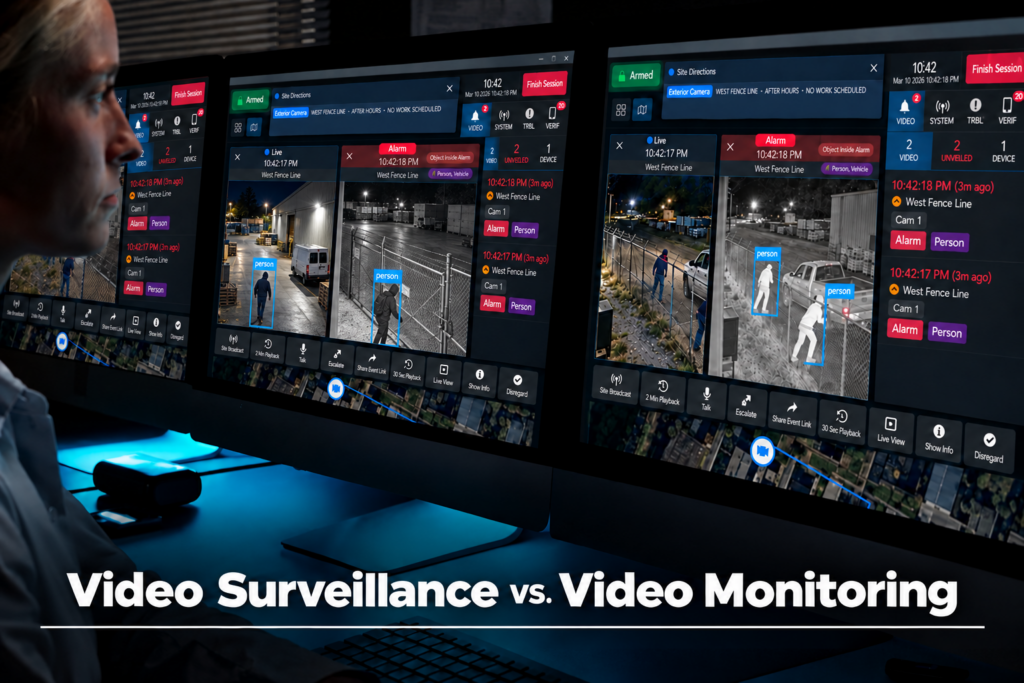
The Short Answer: Video Surveillance vs Video Monitoring
In video surveillance vs video monitoring, surveillance records and stores video so people can review what happened. Verification then adds a person who confirms an alert is real before anyone responds. Monitoring, delivered remotely as remote video monitoring (RVM), goes further again. It intervenes while the event is still happening, with the goal of stopping it.
So the difference between video surveillance and video monitoring is not the camera. It is what happens in the minutes after something triggers. CHeKT frames these as three services rather than two, because verification sits between them and is often sold on its own.
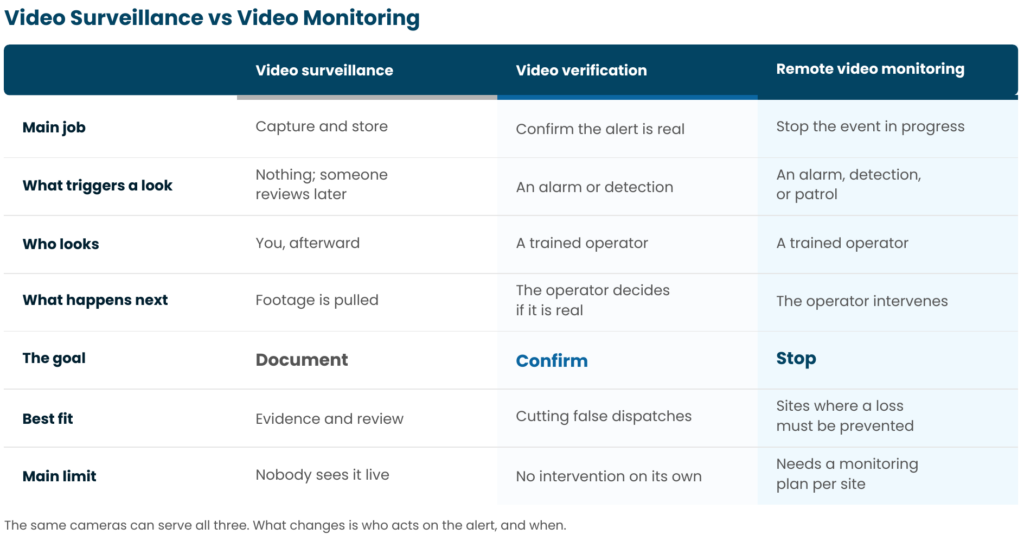
That three-way split matters most in the levels below, where monitoring turns out not to be one service at all.
Video Surveillance vs Video Monitoring: Why the Terms Get Mixed Up
The two terms blur because people use them in at least four different ways.
First, there is recording versus live watching, which is the sense this guide uses. Second, some providers use “monitoring” for alarm and environmental alerts, such as door contacts, rather than cameras. Third, French and EU usage splits public from non-public space, where “videoprotection” covers public areas. Fourth, people contrast closed-circuit analog systems with networked or cloud cameras.
CCTV stands for closed-circuit television. In common use it now covers almost any camera system, including networked cameras that are not closed-circuit at all. So CCTV monitoring and video monitoring usually mean the same thing.
What Video Surveillance Does Well, and Where Video Monitoring Takes Over
Video surveillance is a system that captures, records, and stores video for review. It does that job well, and it is worth having. It gives you evidence for investigations and prosecutions. Footage also settles disputes, supports claims, and records safety incidents. Retained footage is the one thing recording does better than anything else.
The research backs that up, with one caveat. A 2019 meta-analysis of forty years of studies in Criminology & Public Policy found that crime fell by roughly 13% in CCTV areas compared with control areas. The same authors found that schemes with active monitoring beat passive ones, and they warn against using cameras as a stand-alone measure.
That is where recording stops. Nobody sees the event live, so your first response is a review after the loss. It works like a smoke detector that logs a timestamp and calls nobody. CHeKT calls this the gap between reactive and proactive video.
From Video Surveillance to Live Video Monitoring: Five Levels of Response
Response runs from nobody watching to someone watching all night and stepping in. Three things set the level: who sees the alert, how it gets verified, and who acts next.
This is where video surveillance vs video monitoring stops being a two-way choice. The ladder below pulls together published vendor categories and CHeKT’s own three tiers. It is not an industry standard, and providers use these words differently, so ask rather than assume.
1. Recorded only. Video is stored and reviewed after an event, and nobody watches live. This is the passive end of the active vs passive surveillance split, and it is still the most common setup.
2. Self-monitored. Alerts go to you or your staff, who decide and act. It works when someone is awake and near a phone. Otherwise the alert waits until morning.
3. Event-driven video verification. A detection or alarm triggers a look, and a trained operator decides what is real. Monitoring begins here, at CHeKT’s video alarm monitoring tier.
4. Operator-discretion monitoring. The operator can view cameras at will, not only when an event fires. This is CHeKT’s middle tier, and it suits sites where activity needs watching, not just alarms.
5. Live guarding. An operator watches continuously and can step in, usually through live audio. Also called a virtual guard, it is CHeKT’s top tier.
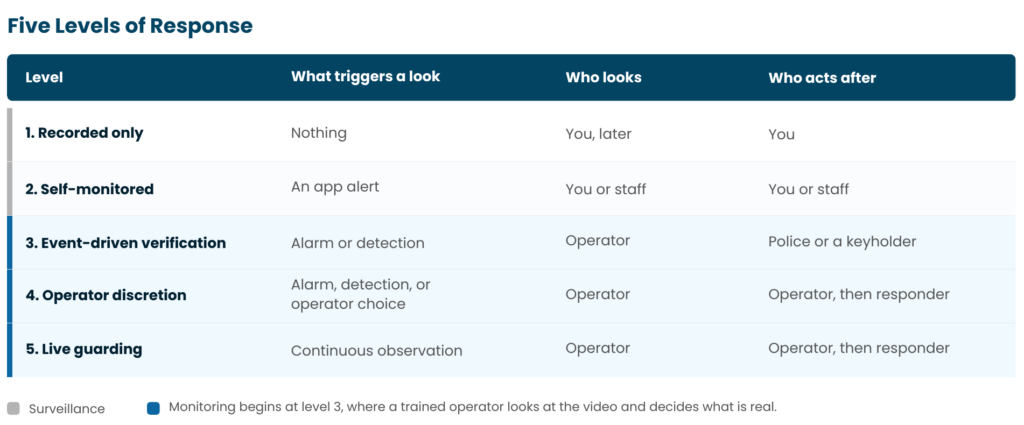
CHeKT sets out its tiers in its guide to selecting a video monitoring service. Some providers label the middle of this ladder video surveillance monitoring, so check what it includes.
What Happens After an Alert: Detect, Verify, Deter, Respond
Detection starts the clock. But verification and deterrence decide the outcome, and this sequence is where video surveillance vs video monitoring becomes concrete. Here are the four steps, and who owns each.
1. Detect
A sensor, a detection zone, or a video analytics rule flags a person or vehicle in a set area. A detection zone is just a part of the camera view where activity should raise an alert. The system owns this step. So detection is the trigger, not the verdict.
2. Verify
An operator at a monitoring center looks at the video and decides whether the event is real or a false alarm. A person owns this step.
AI detection is not verification. Analytics sort pixels, while a trained person confirms what is happening and owns what follows. That is video verification, and the operator sees the alert in context in the CHeKT Video Control Panel.
3. Deter
The operator speaks to the person on site through live audio, known as talkdown, or sets off a siren or strobe while the event is in progress. The operator owns this step.
This step only exists where someone is watching. In fact, stepping in while the event happens is what separates remote video monitoring from video verification.
4. Respond
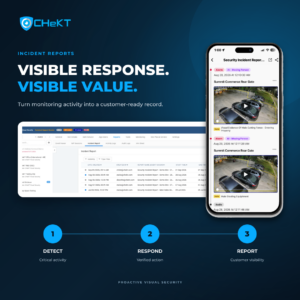
A verified alert, carrying live video and context, goes to the responder: police, a guard, a keyholder, or an internal contact. The responder owns this step. A bare alarm carries none of that context, so it gets treated differently. CHeKT’s incident reports show what a documented event looks like afterward.
Video Surveillance vs Video Monitoring: Which Do You Need?
In video surveillance vs video monitoring, the right level depends on what a missed event costs you, and on whether anyone is watching when events happen. Start with the incident that made you look into this.
1. Do you need evidence afterward, or to stop something in progress? Evidence points to level 1 or 2. Stopping points to level 3 and up.
2. Is anyone on site, or reachable and awake, when events usually happen? If not, self-monitoring will not work.
3. Is there a bounded space and a period when nobody should be inside it? Without that secure state, analytics fire on normal activity. So fix the design before adding monitoring.
4. How often do your current alerts turn out to be nothing, and who handles them? High false-alarm volume points to verification.
5. What does a missed event cost you? Count what stops, for how many days, plus damage, claims, and safety risk.
6. Who has to act, and how fast? Police, a guard, a keyholder, or your own staff each need a different plan.
When recording alone is enough
Sometimes it is. Low-risk interior areas, sites staffed whenever they are open, and cameras whose job is a record rather than prevention all do fine on recording. If you mainly need proof for disputes, claims, or training, monitoring adds cost without adding much. Be honest about which cameras do which job.
Can You Add Video Monitoring to the Surveillance Cameras You Already Have?
Often, yes. It depends on the cameras and how they connect, and the way to find out is a compatibility check, not a replacement quote.
That check looks at four things. First, whether your cameras or recorder are compatible. Second, whether the network can carry live video out. Third, whether audio hardware exists for the Deter step. Fourth, whether each camera’s view and resolution let analytics and an operator see what is at risk.
That last point matters more than people expect. A wall-to-wall panoramic view spreads detail thinly, so give each camera a defined job. CHeKT covers compatibility on its integrations page.
Cost, Privacy, and Compliance: What to Know Before You Choose
This section is provided for general informational purposes and is not legal advice. Confirm current requirements with your counsel or compliance officer.
Cost depends on three drivers: the level of service, the number of cameras and sites, and the response model. A site at level 3 with four cameras is a different proposition from level 5 with twenty. So ask how a provider structures pricing before you compare quotes, because per-camera, per-site, and per-event models do not line up.
Privacy depends on where the cameras point and who they record. Rules vary by state, and workplace recording raises its own questions, so CHeKT’s overview of security cameras in the workplace is a starting point, not a final answer. Securing the system matters too: remote access should be controlled and auditable, which CHeKT covers in its guidance on secure remote video access.

Questions to Ask Any Video Monitoring Provider
Put these to any provider before you sign.
- Who sees an alert first, a person or software only?
- How is an event verified, and what does the operator actually see?
- What can the operator do — audio, siren, strobe, calls, dispatch — and who writes the response instructions for each site?
- What is each camera’s job, and does its view support that job?
- How are false alarms handled?
- Does it work with the cameras I already have?
- How is footage retained and secured, and what incident documentation do you produce?
- How is pricing structured: by camera, by site, or by event?
Then find a CHeKT provider near you to walk a site.