Why Remote Video Monitoring Needs a Better Post-Incident Story
Remote video monitoring incident reports turn a few minutes of verified activity into something the customer can actually read.
The most important work happens in a very short window. An alert comes in. A trained operator pulls up live video. Suspicious activity gets verified. An audio warning goes out. Police or a responsible party gets a call. The night ends without a theft, an injury, or a loss.
That is what the customer is paying for. What they see is a notification, a short clip, and a line in an activity log. The verification, the judgment, the deterrence, and the escalation all happen out of view.
Like many other security systems, remote video monitoring has a communication problem. The service can perform exactly as designed and still leave the customer without a clear account of what happened, what the monitoring team did, and why it mattered.
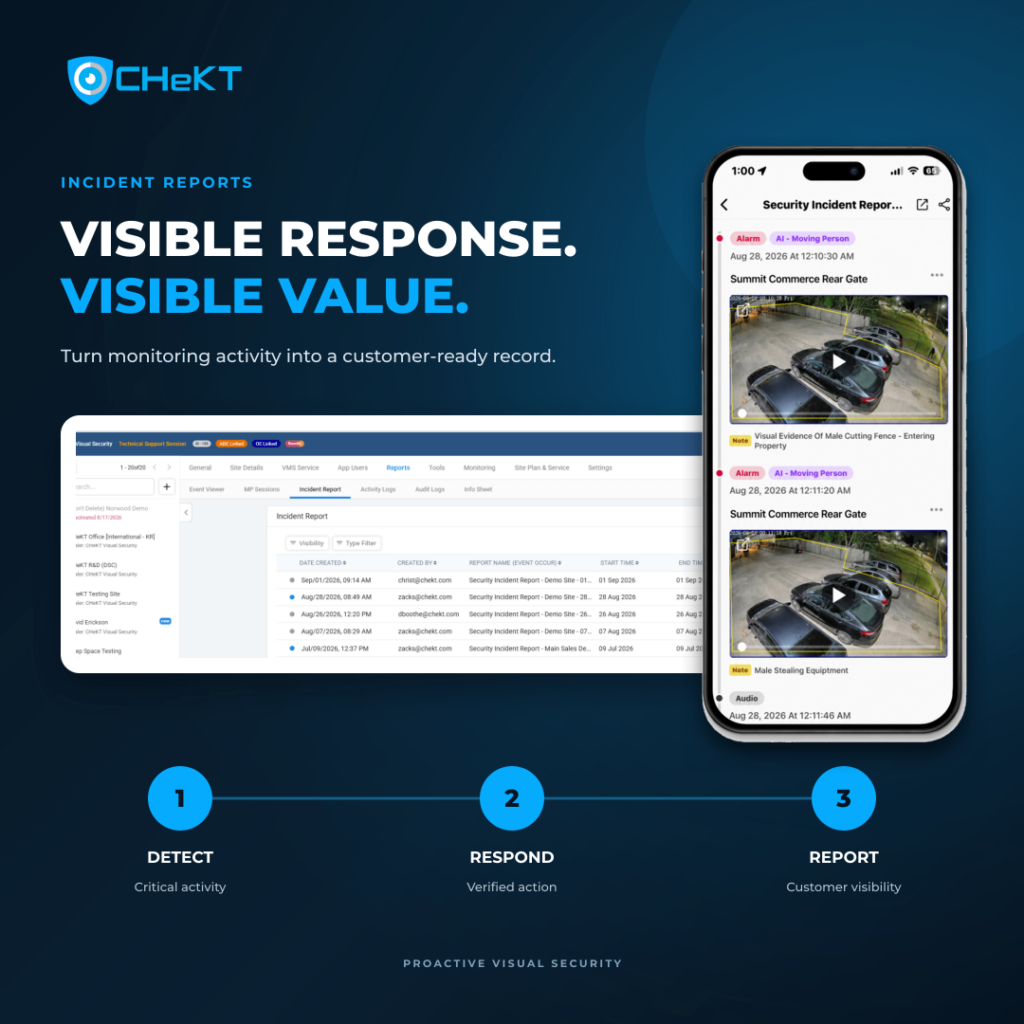
CHeKT Incident Reports close that gap. An operator can turn selected incident activity into a customer-ready report they can review in the cloud-based CHeKT web portal or mobile app.
This guide covers how the feature works, what belongs in a useful report, and how dealers can build reporting into a stronger RVM customer experience.
Why Critical Incident Reporting Creates Operational Value and Customer Confidence
A camera event and a customer-ready incident report do different jobs. A camera event tells the platform something occurred. An incident report helps a person understand why that event mattered.
Customers rarely judge monitoring value by counting alerts. They judge it by whether the system caught something meaningful, whether a person looked at it, whether the response fit the situation, and whether anyone explained it afterward.
Multi-location operators feel this most. A security director responsible for two hundred sites cannot review every event from every camera. They need the significant incidents pulled out of the routine traffic and presented in a form they can read in a minute.
A consistent reporting process helps dealers:
- Make the monitoring response visible after the live event has ended
- Give customers a clearer account of critical activity
- Walk into post-incident calls with organized information
- Show the difference between a raw alert and a verified response
- Deliver the same reporting experience across every location
- Give sales and service teams a concrete example of recurring RVM value
The report earns its value by translating operational activity into customer understanding. It answers the question every RVM customer eventually asks: what did my video monitoring service actually do for me?
What CHeKT Remote Video Monitoring Incident Reports Do
Under the CHeKT Report Incident Feature workflow, a Monitoring Portal operator creates an Incident Report while reviewing an alarm event. The operator selects the activity that belongs in the report, classifies the incident, adds supporting information, and decides whether to publish the report to the customer or keep it internal.
Published reports appear for customers under Reports in the CHeKT web portal and mobile app. Dealers manage them from the Dealer Portal under Reports > Incident Reports.
One service experience, two views. The dealer gets an organized record for management and follow-up. The customer gets one place to review the incidents that matter.
What a Strong Incident Report Should Communicate
A useful report does more than confirm that a camera fired an alarm. It should move the reader from event to response to outcome without making them decode anything.
- The critical event. What activity triggered the incident review?
- The surrounding context. What relevant activity happened before or after?
- The incident classification. Suspicious activity, loitering, vehicle suspicion, a crime intervention like this guided apprehension, or another dealer-defined category?
- The monitoring response. Was the situation verified, deterred, escalated, or dispatched?
- The recorded outcome. What action was documented before the session closed?
- The customer access point. Where does the customer go to review the published report?
Aim for clarity over volume. A customer should understand the incident without interpreting a long event list or learning platform terminology.
How the CHeKT Incident Report Workflow Works
The workflow starts inside the Monitoring Portal and ends with either customer visibility or internal documentation.
- Review the alarm event. The operator begins with the critical event already open in the Monitoring Portal.
- Select Report Incident. The report starts from the event itself, so nobody rebuilds the timeline somewhere else.
- Choose the report time range. The incident event only, 15 minutes on either side, or 30 minutes on either side. Pick the window that explains what happened.
- Choose the Incident Type and Sub-Category. Dealers customize these, so reports use the language of their own monitoring operation.
- Add relevant report information. The operator adds supporting details and selects the activity that belongs in the record.
- Choose the audience. Publish to the customer or keep it as an internal report, depending on the incident and the dealer’s process.
- Review the published report. Customers open published reports in the web portal or mobile app. Dealers manage them from the Dealer Portal.
That sequence gives operators enough structure for consistency without forcing every incident into an identical story. The dealer sets the standard. The operator applies it to the event in front of them.
Why the Monitoring Response Matters as Much as the Detection
Detection gets the attention. Response creates the value.
With real-time video monitoring, an AI analytic can give you proactive threat detection and recognize a person or a vehicle. What happens next is the part worth paying for.
The CHeKT Monitoring Portal Session Completion Process supports response classifications that may include police dispatch and several forms of deterrence: lights or siren, text-to-speech, prerecorded audio, operator talkdown or intercom, relay or other automated actions.
Those classifications keep monitoring teams using the same vocabulary when they close a session. They also give dealers something solid to point at when explaining the response behind the service, as long as the customer-facing report reflects what the workflow actually recorded.
Detection
The system identifies activity that meets the configured rule, whether that comes from video analytics, an alarm signal, a camera event, or another connected source.
Verification
A trained operator reviews what is available and decides whether the event looks routine, suspicious, or urgent. That human review is what separates verified alarm response from an unconfirmed notification.
Deterrence or Escalation
When the situation calls for it, the response may include live audio deterrence, a prerecorded warning, lights or siren, a call to a responsible party, or verified dispatch under the site’s procedures.
Documentation
The published report gives the customer a convenient place to review the incident, in the web portal or on their phone.
The incident gets classified and the response gets recorded, so the dealer and the customer both have an account of what mattered.
Customer Review
That progression is the real RVM story: detect, verify, respond, document, review.
The Dos: Best Practices for Dealer Incident Reporting
The strongest reporting programs run on clear standards. Operators should never have to guess which events deserve a report, what goes in it, or whether the customer should see it.
Do Establish Clear Reporting Criteria
Define which incidents trigger a customer-facing report: verified trespass, attempted theft, audio deterrence, police dispatch, suspicious loitering, vehicle activity near a restricted area, or anything else that matters to that customer.
Make the criteria specific enough to produce consistency and loose enough to account for site instructions and severity.
Do Customize Incident Types and Sub-Categories
CHeKT lets dealers customize incident classifications. Build categories that make sense to operators and to customers. Keep the list short. A small, well-defined set is easier to apply correctly and easier for customers to read.
Do Include the Context That Explains the Event
The initial alarm captures one moment. The selected time range shows how the activity developed and why the response fit. Include the surrounding events that strengthen the account. Leave out the routine activity that only adds noise.
Do Write for the Customer
Use plain language. Nobody should need monitoring-center training to read the report. Say what was observed, what action was taken, and what happened next. Skip the unexplained abbreviations and camera codes.
Do Separate Internal and Customer-Facing Reporting
Not every internal note belongs in front of a customer. Use the Internal Report option when the information is operational, incomplete, or sensitive. Publish when the report is accurate, appropriate, and useful.
Do Build Reporting Into Customer Follow-Up
A report is worth more when it feeds a consistent service process that dealers and integrators can repeat account to account. For significant incidents, reference the report on a call, in a service review, or at an account meeting. That conversation connects the documented event to the ongoing value of the service.
The Don’ts: Reporting Mistakes That Weaken RVM Value
Most reporting problems trace back to inconsistent standards, unclear language, and reports that never make it into the customer relationship.
Don’t Publish Every Alarm as a Critical Incident
If every motion event becomes an Incident Report, the report library stops meaning anything. Reserve customer-facing reports for events that deserve attention. Then a new report actually signals something.
Don’t Confuse Activity With Response
A clip of a person or vehicle is only half the story. If the team verified, deterred, contacted, or dispatched, make sure the approved reporting process captures it. The customer should understand what the service did, not just what the camera saw.
Don’t Overstate the Outcome
Stick to what the session documented. Avoid claiming the system prevented a crime, caused an arrest, eliminated liability, or guaranteed any outcome unless the evidence and approved company language support it. Accurate reporting builds more trust than dramatic reporting.
Don’t Mix Separate Reporting Workflows
CHeKT also documents an older Event Viewer PDF reporting workflow that builds a customized PDF from selected events for email or download. It is useful, but it is not the same as the newer operator-created report published for web and mobile review. Define when each format applies.
Don’t Leave Ownership Undefined
Decide who creates the report, who reviews the customer-facing language, who publishes, who follows up, and who audits quality. Without owners, a good feature drifts into inconsistency across operators and locations.
Don’t Treat Documentation as a Substitute for Response
A polished report cannot cover for weak monitoring procedures. Incident Reports work best when they document a process that already handles detection, human verification, site-specific action, deterrence or escalation, and accurate session completion.
What to Include in a Dealer Incident Reporting Playbook
Dealers who want consistent reporting should write the process down in a short playbook for operators and account managers. At minimum:
- The incident types that require a customer-facing report
- The incident types that stay internal
- Definitions for every Incident Type and Sub-Category
- Guidance on choosing the event-only, 15-minute, or 30-minute range
- What operators should include in customer-facing notes
- Approved language for deterrence, dispatch, and unresolved outcomes
- The role authorized to publish reports
- The follow-up process for significant customer incidents
- A quality-review schedule for published reports
- A process for updating categories and instructions as the service changes
The playbook does not need to be long. Its job is to make sure two operators looking at similar incidents produce reports that are equally clear, accurate, and useful.
How Incident Reports Turn RVM Activity Into Visible Service Value
Most customers grasp the idea of video monitoring without ever seeing the work. The operator may have checked several angles, recognized a pattern, issued a warning, called a responsible party, and escalated under the site’s instructions. If all the customer gets is an alarm notification, that entire effort disappears.
Incident Reports give dealers a practical way to show the response behind the recurring service. A technical sequence becomes a story with a beginning, a middle, and an end:
- The system detected critical activity.
- A trained operator reviewed and verified the situation.
- The monitoring workflow produced an appropriate action.
- The event and recorded outcome were organized for review.
- The customer got a convenient place to understand what happened.
This is where proactive video monitoring gets easier to explain. Passive cameras preserve footage for later. Proactive monitoring identifies developing activity and supports action while the event is still happening. Incident Reports make that action visible once it is over.
How CHeKT Supports a Consistent Multi-Site Response
CHeKT Proactive Visual Security connects cameras, analytics, alarm events, live video verification, operator workflows, deterrence tools, and customer access in one ecosystem.
For dealers and monitoring partners, that connected workflow supports a consistent response model across scattered customer locations. Critical events move through a repeatable process built around verification and action, instead of depending on whoever happens to be on site to notice, interpret, and write something down.
Incident Reports support that model by helping dealers:
- Organize critical events using dealer-defined classifications
- Include the relevant activity surrounding the initial event
- Keep customer-facing reports separate from internal documentation
- Give customers web and mobile access to published reports
- Deliver consistent post-incident communication across locations
- Connect monitoring activity to recurring service value
For a multi-site customer, consistency may be the biggest win — the kind of consistency a multi-location retail security program is built around. A clear reporting standard gives leadership one repeatable way to review important incidents, instead of every location improvising with screenshots, emails, and informal summaries.